

You have a list of names, and you need to know where one of them sits. Maybe it's "Ravi" and you want the slot number so you can update the next value, or check a matching list at the same spot. That's the everyday job of finding the position of a string in a list, and Python gives you a few ways to do it depending on what you actually need.
The short answer is the index() method. But it has one sharp edge that trips up beginners, and it only ever finds the first match. So this walks through index() properly, then covers how to find string position in a list safely, how to get every position, how to match on part of a string, and how to pick the right tool for the job.
The quick way to find a string with index()
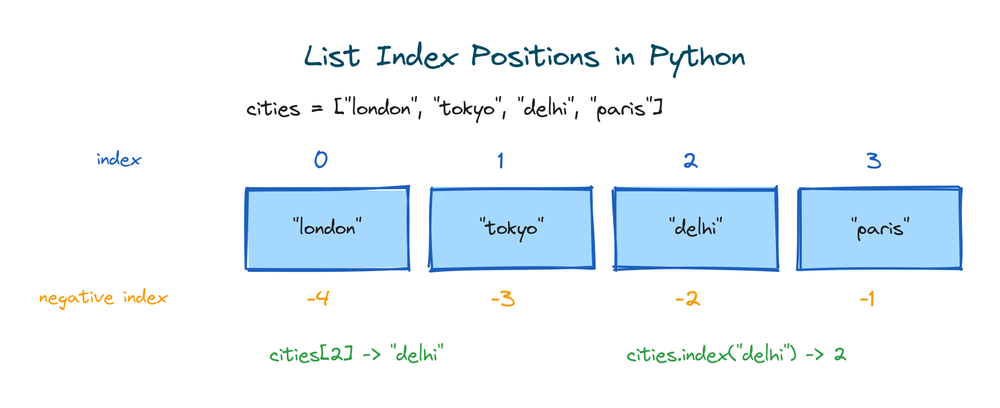
Every item in a Python list has a position, called its index. The first item is at index 0, the second at 1, and so on. The index() method takes a value and hands back the position where it lives.

fruits = ["apple", "banana", "cherry", "date", "fig"]
position = fruits.index("cherry")
print(position)
# Output: 2
The index() method returns the position of the first matching item. Here "cherry" is the third item, so its position is 2, because counting starts at 0. That's the whole idea for the common case. The rest of this article is about the parts that go wrong.
Check that the string is there first with in
Here's the sharp edge. If you ask index() for something that isn't in the list, it doesn't return -1 or None the way some other languages do. It stops your program with an error.
fruits = ["apple", "banana", "cherry"]
print(fruits.index("mango"))
# ValueError: 'mango' is not in list
So before you search, it's often smart to check the item is even there. The in keyword answers yes or no, and it never raises an error.
fruits = ["apple", "banana", "cherry"]
if "banana" in fruits:
print(fruits.index("banana"))
else:
print("not found")
# Output: 1
This pre-check pattern is clean and easy to read. There's one thing to know about it though. When you write if "banana" in fruits and then fruits.index("banana"), Python scans the list twice, once to check and once to find. For a short list nobody cares. For a huge list in a tight loop, the try/except approach further down does it in one pass.
What ValueError means and how to handle it
Coming from JavaScript or C, you might expect a missing value to give you -1. Python doesn't work that way on purpose. A missing item is treated as a real problem, so it raises a ValueError and you deal with it out loud. You have two clean ways to do that.
The first you already saw: check with in before calling index(). The second is to try the search and catch the error if it fails. This is the one-pass version.
fruits = ["apple", "banana", "cherry"]
try:
pos = fruits.index("mango")
except ValueError:
pos = -1
print(pos)
# Output: -1

Notice we chose to return -1 ourselves as a "not found" signal. That's fine when your own code checks for it right after. Just know that Python won't hand you -1 for free the way index() does in some languages, so you have to opt in. If -1 could be a real position in your logic, return None instead to avoid confusion.
Which one should you use? If you'll search once and a missing value is normal, the in check reads more clearly. If you're in a performance-sensitive loop or a missing value is genuinely unexpected, use try/except. Both are correct.
Searching part of the list with start and end
The index() method takes two more arguments, a start position and an end position. They let you search only a slice of the list, which is exactly how you find the second match instead of the first.
letters = ["a", "b", "c", "b", "d"]
first = letters.index("b")
second = letters.index("b", first + 1)
print(first, second)
# Output: 1 3
The second call starts looking from position 2 onward, so it skips the first "b" and finds the one at index 3. The end argument works the same way as a slice, so letters.index("b", 0, 2) only searches positions 0 and 1.
Find the position of a string that appears more than once
The trick above works, but stepping through matches one at a time gets awkward fast. When a value shows up several times and you want the first spot, remember index() already gives you that. Scanning left to right, it stops at the first match and ignores the rest.

names = ["Ann", "Ravi", "Sara", "Ravi", "Ann"]
print(names.index("Ravi"))
# Output: 1
There's a second "Ravi" at position 3, but index() never gets there. It returns 1 and stops. If the first position is all you need, you're done. If you need every position, that's the next section.
Find all positions of a string with enumerate
To collect every spot a string appears, pair each item with its position using enumerate(), then keep the positions that match. A list comprehension does it in one line.

names = ["Ann", "Ravi", "Sara", "Ravi", "Ann"]
positions = [i for i, name in enumerate(names) if name == "Ravi"]
print(positions)
# Output: [1, 3]
Here enumerate() gives you pairs like (0, "Ann"), (1, "Ravi"), and so on. You keep i whenever the name matches. If you find the comprehension hard to read at first, the same thing as a plain loop is just as good:
names = ["Ann", "Ravi", "Sara", "Ravi", "Ann"]
positions = []
for i, name in enumerate(names):
if name == "Ravi":
positions.append(i)
print(positions)
# Output: [1, 3]
Use enumerate() whenever you need every position, not just the first. It's the standard Python way and it reads cleanly once you've seen it a couple of times.
Find strings that contain a substring
Sometimes you don't want an exact match. You want the position of every string that contains some text, like every email with "gmail" in it. Swap the == for the in keyword inside the same enumerate pattern.
emails = ["[email protected]", "[email protected]", "[email protected]"]
gmail_spots = [i for i, e in enumerate(emails) if "gmail" in e]
print(gmail_spots)
# Output: [0, 2]
Here "gmail" in e is true when "gmail" appears anywhere in the string. This is a substring test on the string itself, not a list check. It's the same in keyword, but on text it means "is this piece inside that text".
Case-insensitive search
String matching cares about case, so "Apple" and "apple" are not equal. When you want to ignore case, lower both sides before comparing. The .lower() method gives you a lowercase copy, and you can read more about it in Python string methods.
fruits = ["Apple", "Banana", "APPLE", "cherry"]
target = "apple"
spots = [i for i, f in enumerate(fruits) if f.lower() == target.lower()]
print(spots)
# Output: [0, 2]
Both "Apple" and "APPLE" match now, because we compared their lowercase forms. The original list stays untouched, since .lower() returns a new string and doesn't change the one in the list.
Finding an item in a list of mixed types
A list can hold strings, numbers, and other values all at once. The index() method matches by value and type, so a string "5" and the number 5 are different items.
mixed = ["hello", 5, "5", True, 3.14]
print(mixed.index("5"))
# Output: 2
print(mixed.index(5))
# Output: 1
The string "5" sits at position 2 and the number 5 at position 1, so index() tells them apart correctly. One quirk to watch: in Python, True equals 1 and False equals 0, so a list containing both 1 and True can match either at the same spot. Keep types consistent in a list you plan to search, and you'll avoid the surprise.
Reading the result with negative indexing
Once you have a position, you often want to read the item there, or the ones around it. Positive indexing counts from the front starting at 0. Negative indexing counts from the back, where -1 is the last item, -2 the second to last, and so on.
fruits = ["apple", "banana", "cherry", "date", "fig"]
pos = fruits.index("cherry")
print(fruits[pos]) # the item at that spot
print(fruits[pos - 1]) # the item just before it
print(fruits[-1]) # the last item, counted from the back
# Output:
# cherry
# banana
# fig
Negative indexing is handy when you want the last match or the tail of a list without counting its length. If index() gave you a position and you want to know how far from the end it is, that's just len(fruits) - pos.
Which method to use for finding a string
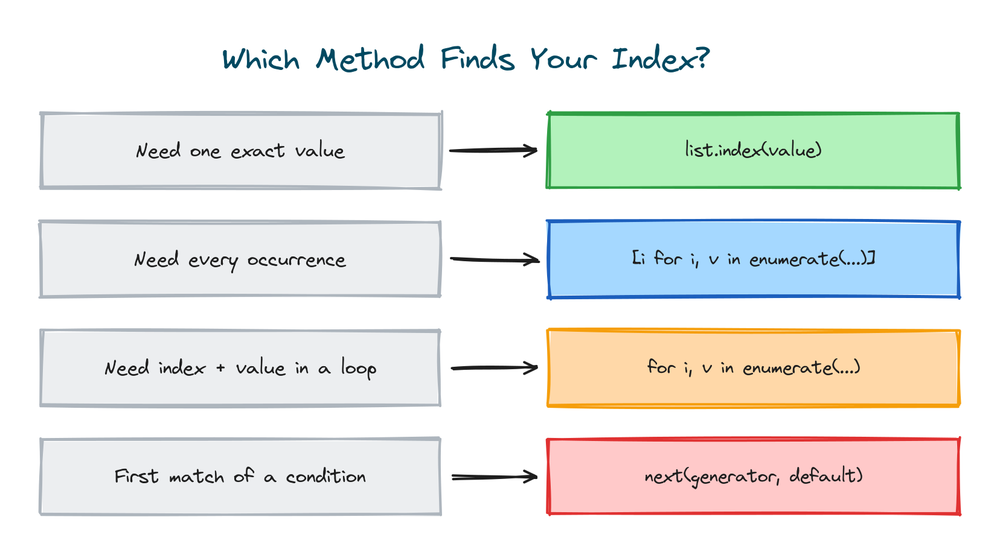
Four tools cover almost every case. The one you pick comes down to a single question: do you need a yes/no, the first position, all positions, or a partial match?

| What you need | Use this | Example |
|---|---|---|
| Is it there at all | in | "x" in items |
| The first position | index() | items.index("x") |
| Every position | enumerate() | [i for i, v in enumerate(items) if v == "x"] |
| Position of a partial match | in with enumerate() | [i for i, v in enumerate(items) if "x" in v] |
| Search a slice, or the next match | index() with start | items.index("x", start) |
Start with index() for the first position, and reach for enumerate() the moment you need more than one. The other list methods are worth knowing too, but these four handle nearly every position-finding job.
How fast is index() and when to use a set
The index() method does a linear scan. It checks item 0, then 1, then 2, until it finds a match. On average it looks at half the list, and in the worst case the whole thing. The work runs in C under the hood, so it's fast per item, but it still grows with the length of the list.
For a one-off search that's completely fine. The problem is repeated membership checks. If you're asking "is this in the list" thousands of times, each check scans again, and it adds up. When you only care whether items exist and not where they sit, convert to a set once. A set checks membership in near-constant time.
names = ["Ann", "Ravi", "Sara", "Ravi", "Ann"]
name_set = set(names)
print("Ravi" in name_set) # near-constant time, no scan
# Output: True
The trade-off is that a set throws away order and duplicates, so it can't tell you a position. Use it for fast repeated "does this exist" checks. Use index() or enumerate() when you actually need the spot.
Handling large numeric lists with numpy
Everything above is plain Python and works on any list. If you're working with very large lists of numbers, though, the numpy library has np.where(), which finds all matching positions in one fast vectorized call. It's built for number crunching, not text, so it's overkill for a short list of names, but useful to know it exists.
import numpy as np
arr = np.array([10, 20, 30, 20, 10])
spots = np.where(arr == 20)[0]
print(spots)
# Output: [1 3]
For everyday string lists, stick with index() and enumerate(). Bring in numpy only when the list is large and numeric and you're already using it for other maths.
Practice exercises
Try each one before you open the solution. Everything you need is above.
Find a single position
Given the list below, print the position of "green".
# Solution
colors = ["red", "green", "blue", "yellow"]
print(colors.index("green"))
# Output: 1
Search safely for a missing value
Print the position of "purple" if it's in the list, otherwise print "not found".
# Solution
colors = ["red", "green", "blue"]
if "purple" in colors:
print(colors.index("purple"))
else:
print("not found")
# Output: not found
Find every position of a repeated string
Print all positions where "yes" appears.
# Solution
answers = ["yes", "no", "yes", "maybe", "yes"]
spots = [i for i, a in enumerate(answers) if a == "yes"]
print(spots)
# Output: [0, 2, 4]
Match a substring
Print the positions of every word that contains "cat".
# Solution
words = ["cat", "category", "dog", "scatter"]
spots = [i for i, w in enumerate(words) if "cat" in w]
print(spots)
# Output: [0, 1, 3]
Ignore the case
Print the positions of "hello" ignoring case.
# Solution
words = ["Hello", "world", "HELLO", "hello"]
target = "hello"
spots = [i for i, w in enumerate(words) if w.lower() == target]
print(spots)
# Output: [0, 2, 3]
Common mistakes
- Expecting index() to return -1 when the value is missing. It raises a
ValueErrorinstead. Check withinfirst, or wrap it in try/except. - Forgetting that index() only finds the first match. If a value repeats, you get the earliest position and nothing else. Use
enumerate()for all of them. - Mixing up the value and its position.
index()takes the value and returns the position. Passing a number expecting it to look up a slot is a common slip. - Case-sensitive matching by accident. "Apple" and "apple" are different strings. Lower both sides when case shouldn't matter.
- Confusing an exact match with a substring match.
==checks the whole string,inchecks for a piece inside it. Pick the one you mean.
Frequently asked questions
How do I find the position of a string in a list in Python?
Use the index() method: my_list.index("target") returns the position of the first match, counting from 0. If the string might be missing, check with "target" in my_list first so you don't hit a ValueError.
What happens if the string is not in the list?
index() raises ValueError: 'x' is not in list. Python doesn't return -1 like some languages. Either check with in before searching, or wrap the call in a try/except and set your own fallback.
How do I find all positions of a string, not just the first?
Pair each item with its position using enumerate() and keep the ones that match: [i for i, v in enumerate(items) if v == "x"]. That gives a list of every position where the string appears.
How do I find the position of a string that contains a substring?
Use in inside the enumerate pattern: [i for i, v in enumerate(items) if "part" in v]. This finds every string that has "part" anywhere inside it, not just exact matches.
Is index() case sensitive?
Yes. "Apple" and "apple" won't match. To ignore case, compare lowercase copies with .lower() on both the list item and the value you're searching for.
How do I get the last position instead of the first?
Collect all positions with enumerate() and take the last one, or reverse the search. The quick way is max(i for i, v in enumerate(items) if v == "x"), which gives the highest matching position.
Is index() slow on a big list?
It's a linear scan, so it checks items one by one until it finds a match. That's fast for a single search. If you're checking membership many times, convert the list to a set once, since a set checks existence in near-constant time.
Key takeaways
- Use
index()to find the first position of a string in a list. It counts from 0. index()raises aValueErrorwhen the value is missing, so check withinfirst or use try/except.- Use
enumerate()to find every position, not just the first one. - Swap
==forinto match strings that contain a substring, and use.lower()for case-insensitive search. - For repeated existence checks, a set is faster; for large numeric data, numpy's
np.where()finds all matches at once.
Finding a position is one small piece of working with lists. Once you can locate an item, the next thing you'll reach for is the full toolkit of Python list methods for adding, removing, sorting, and counting.

By Komal Gupta