

Sooner or later you try to print a message with a number in it, and Python stops you with an error. You wrote a program that has a count or a price sitting in an int, and now you want it inside a sentence. The number has to become text first. That's what converting an int to a string means, and Python gives you a few ways to do it.
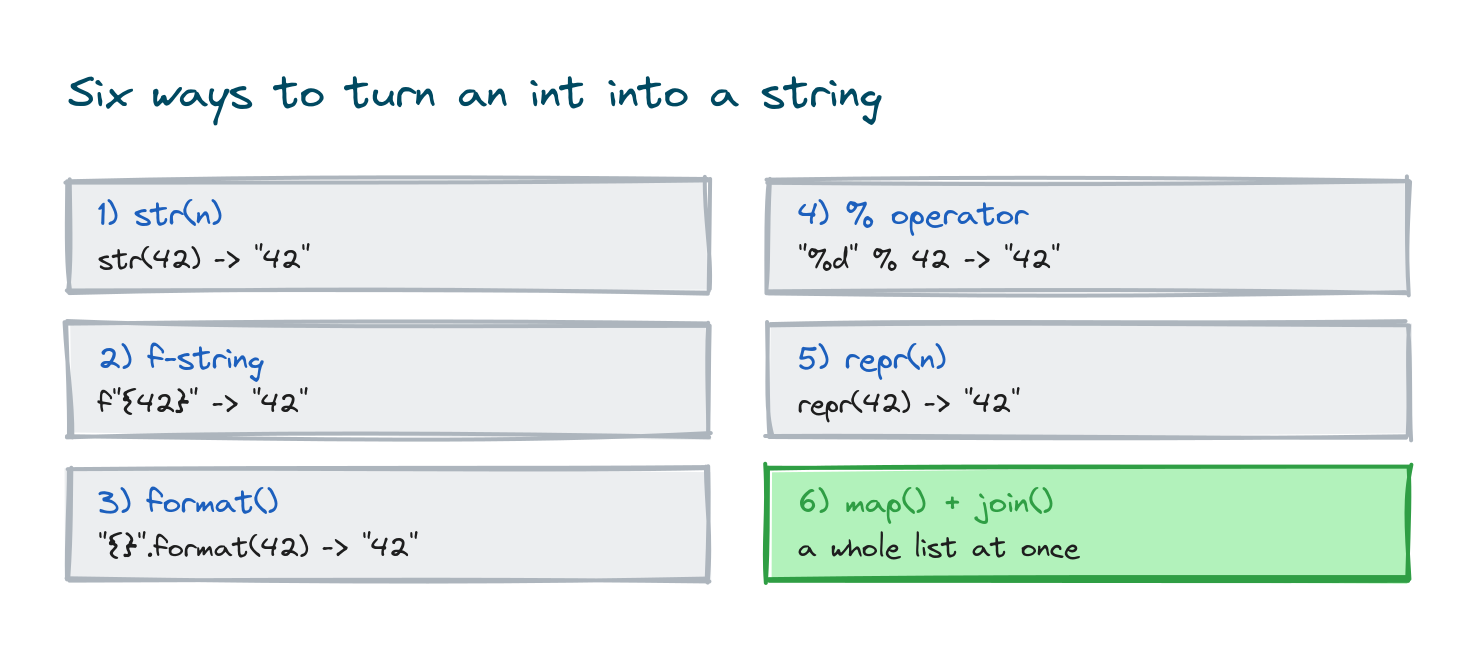
For a plain conversion, use str(). When you're building a message around the number, use an f-string. Those two cover almost everything. The % operator and .format() also work, but you'll mostly meet them in older code. This post walks through all six ways, each with a real value, the string you get back, and a place you'd actually use it.
Why you need to convert at all
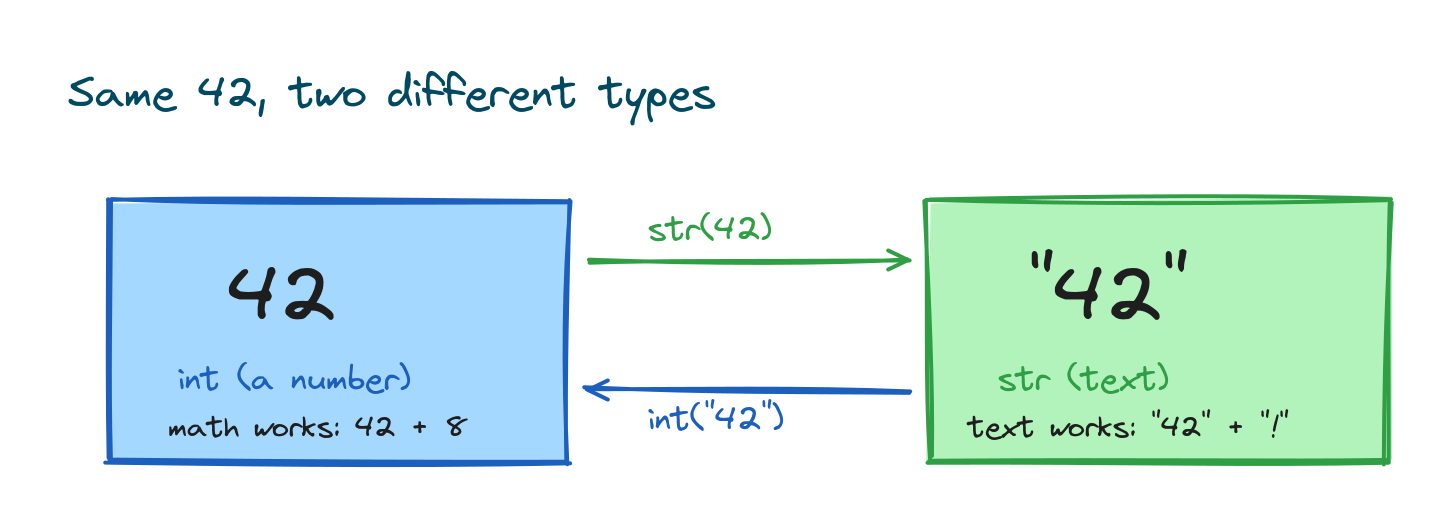
An int is a number Python can do math with. A string is text. They look similar on screen, but Python treats them as separate types, and it won't quietly mix them. Try to glue a number onto text with + and it stops:
count = 5
print("You have " + count + " new messages")
# TypeError: can only concatenate str (not "int") to str

Python is telling you it can only join a string to another string. The number 5 isn't a string, so the join fails. Convert it first and the same line works:
count = 5
print("You have " + str(count) + " new messages")
# Output: You have 5 new messages
That's the whole idea. The number becomes "5", text joins to text, and Python is happy. Now let's look at each way to do that conversion.
The six ways at a glance
Here are all six, side by side, converting the same value. They give you the same string:
n = 42
print(str(n)) # 1) str()
print(f"{n}") # 2) f-string
print("{}".format(n)) # 3) format()
print("%d" % n) # 4) % operator
print(repr(n)) # 5) repr()
# Output:
# 42
# 42
# 42
# 42
# 42

The sixth way, map() with join(), is for turning a whole list of numbers into one string, so it gets its own section near the end. The rest each get a section below.
1) The str() function
This is the one to reach for. str() takes almost anything and gives you its string form. Hand it an int and you get the digits as text:
age = 30
text = str(age)
print(text)
# Output: 30
print(type(text))
# Output: <class 'str'>
The type() line proves the result really is a string now, not a number. Once it's a string, you can join it to other text with +. A common use is building a short message from a value your program worked out:
score = 91
message = "Your score is " + str(score) + " out of 100"
print(message)
# Output: Your score is 91 out of 100
If you just need the number as text and nothing fancy, str() is the answer. It's short, everyone reading your code knows it, and it works the same on every version of Python.
2) F-strings
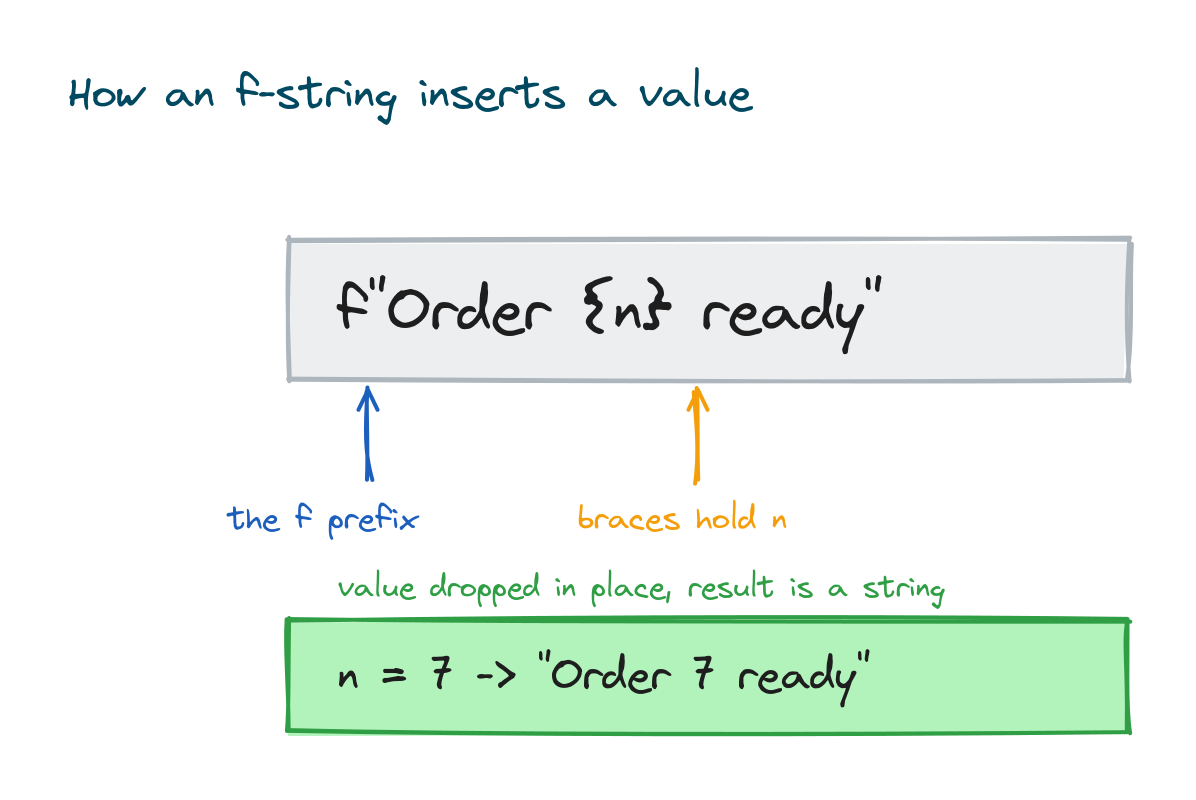
An f-string is a string with an f right before the opening quote. You put the value inside curly braces, and Python drops it into the text as a string for you. No +, no separate str() call:
orders = 7
print(f"Order {orders} is ready")
# Output: Order 7 is ready

This is the cleanest way to build text around a number, so it's what you'll use most when the number is part of a sentence. You can put several values in one line, and the number stays an int right up until it's printed:
day = 6
month = 7
year = 2026
print(f"Date: {day}/{month}/{year}")
# Output: Date: 6/7/2026
f-strings have been in Python since version 3.6, so any current setup has them.
Padding and formatting inside the f-string
Here's a bonus that makes f-strings worth learning well. After the value you can add a colon and a short instruction that controls how the number looks. Two of them come up all the time. To pad a number with leading zeros, put the total width after a 0:
invoice = 42
print(f"Invoice {invoice:05d}")
# Output: Invoice 00042
That's handy for invoice numbers, order IDs, or anything that should line up at a fixed width. To group thousands with commas, use a comma:
views = 1234567
print(f"{views:,} views")
# Output: 1,234,567 views
The plain string formatting lesson goes deeper on these specs. For converting an int to readable text, leading zeros and commas are the two you'll want first.
zfill for padding a string you already have
If you already turned the number into a string, zfill() pads it with zeros to the width you ask for. Same result as the 05d spec, just done to the string after the fact:
page = str(7)
print(page.zfill(3))
# Output: 007
3) The format() method
Before f-strings arrived, .format() was the usual way to build text with values in it. You write a template string with empty braces as slots, then call .format() to fill them:
level = 3
print("You reached level {}".format(level))
# Output: You reached level 3
The int goes in and comes out as text in the sentence. The same format specs from the f-string section work here too, so you can pad or add commas the same way:
total = 1500000
print("Total: {:,}".format(total))
# Output: Total: 1,500,000
There's one spot where .format() still earns its place in new code: when the template lives somewhere else, like a config file or a database row. An f-string runs the moment Python reads that line, but a plain "level {}" string can be stored, passed around, and filled in later. For everything you type directly in your code, an f-string is shorter.
4) The % operator
This is the oldest style, borrowed from the C language. You put a %d placeholder in the text, then a % and the value after it. %d means "an integer goes here":
tickets = 4
print("You booked %d tickets" % tickets)
# Output: You booked 4 tickets
For a straight int-to-text swap you can also use %s, which turns any value into its string form:
pin = 90210
print("Area %s" % pin)
# Output: Area 90210
The % style isn't broken and you'll still spot it in older tutorials and in Python's logging module. But it's harder to read once you have more than one value, so don't start new code with it. Reach for an f-string instead.
5) repr() and when it differs
The built-in repr() also gives you a string, and for a plain int the result looks exactly like str():
n = 42
print(str(n))
# Output: 42
print(repr(n))
# Output: 42
So why does repr() exist? The two are meant for different jobs. str() gives a friendly, readable form for people. repr() gives a more exact form aimed at a programmer, often one you could paste back into code. For an int there's no difference, but for a string the gap shows up. repr() keeps the quotes:
text = "42"
print(str(text))
# Output: 42
print(repr(text))
# Output: '42'
That's the real use. When you're debugging and want to see whether a value is the number 42 or the string "42", repr() shows the quotes so you can tell them apart. For actually converting an int to a string in normal code, stick with str().
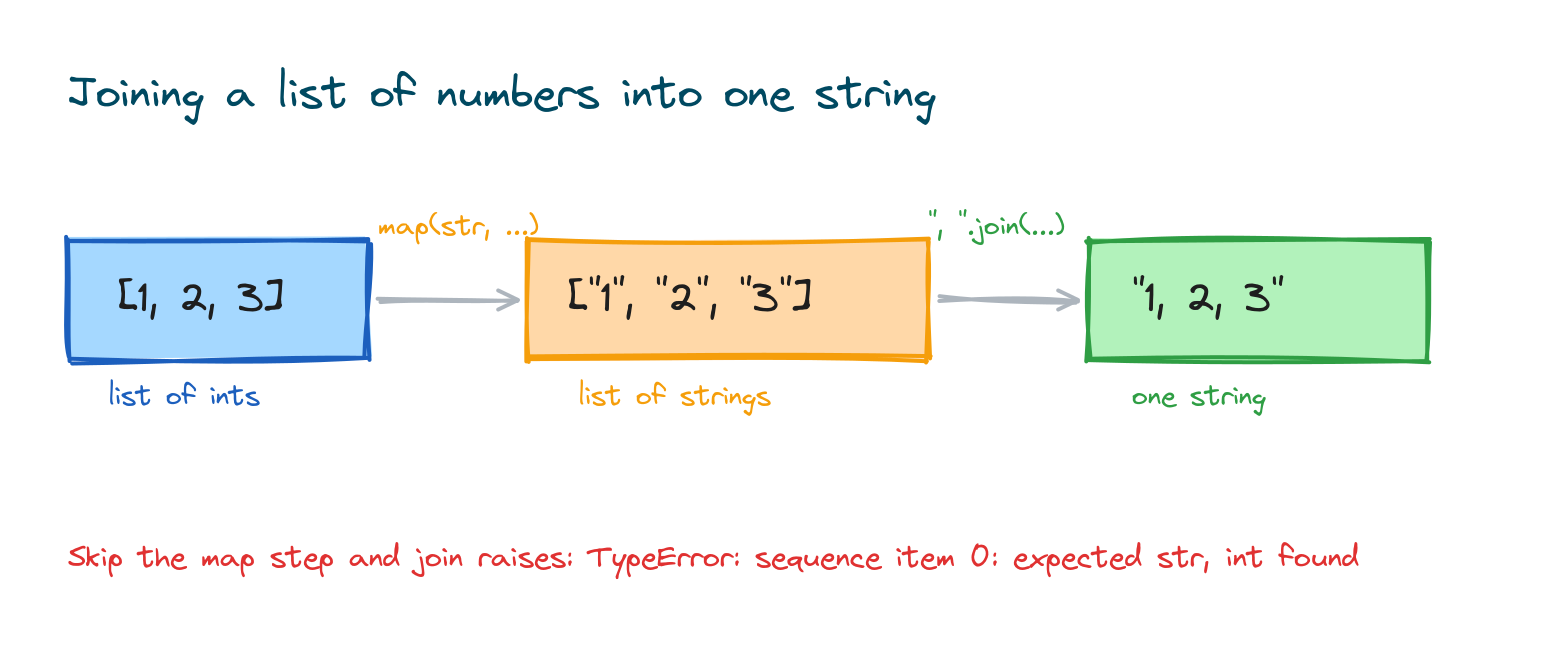
6) Converting a whole list with map() and join()
Everything above converts one number. What if you have a list of them and want a single string, like "1, 2, 3"? The natural try is join(), but it fails on numbers:
nums = [1, 2, 3]
print(", ".join(nums))
# TypeError: sequence item 0: expected str instance, int found
join() only glues strings together, and these are still ints. You have to convert each one first. map(str, nums) runs str() over every item, then join() stitches the results:
nums = [1, 2, 3]
result = ", ".join(map(str, nums))
print(result)
# Output: 1, 2, 3

You can pick any separator. A space, a dash, or nothing at all:
digits = [4, 8, 1, 5]
print("".join(map(str, digits)))
# Output: 4815
A list comprehension does the same thing if you find it clearer: ", ".join([str(x) for x in nums]). Both work. Use whichever reads better to you.
Int to string in another base
Sometimes you don't want the plain decimal digits. You want the number written in binary, hex, or octal. str() always gives you base 10, so it can't do this. Python has three separate functions for it:
n = 255
print(bin(n))
# Output: 0b11111111
print(hex(n))
# Output: 0xff
print(oct(n))
# Output: 0o377
Each returns a string with a prefix that tells you the base: 0b for binary, 0x for hex, 0o for octal. If you don't want the prefix, an f-string spec drops it and lets you pad at the same time:
n = 255
print(f"{n:b}")
# Output: 11111111
print(f"{n:x}")
# Output: ff
So the rule is simple. Plain text number, use str(). A different base, use bin(), hex(), or oct(), or the matching f-string spec.
Going the other way, string to int
Often you need the reverse. Text comes in, maybe from a form or a file, and you need a number to do math with. int() parses a string of digits back into an int:
text = "42"
n = int(text)
print(n + 8)
# Output: 50
It only works if the string is actually a whole number. A stray letter or a decimal point makes it fail:
int("42a")
# ValueError: invalid literal for int() with base 10: '42a'
For a number with a decimal point, you want float() instead, covered in the string to float lesson. Converting between types like this is called type casting, and there's a full lesson on it linked at the end of this post.
Which one should you use
You don't need to weigh all six every time. Here's the short version:
- Just need the number as text? Use
str(). - Building a message around it? Use an f-string.
- Turning a list of numbers into one string? Use
", ".join(map(str, nums)). - Reading old code? That's where
.format()and%turn up. They still work; you just don't need to write new code with them.
On speed, str() and f-strings are both fast, and the difference between them is far too small to notice in a real program. Pick the one that reads clearly. Don't rewrite working code to save a fraction of a microsecond.
Common mistakes
- Joining a number to text with
+."total " + 5raisesTypeError. Wrap the number instr(), or use an f-string. - Calling
join()on a list of ints.", ".join([1, 2, 3])fails. Convert first withmap(str, ...). - Expecting
str(255)to give binary or hex. It always gives base 10. Usebin()orhex()for other bases. - Forgetting the
f.print("{n}")prints the literal{n}, braces and all. There's no error, so it slips by easily. - Mixing up
str()andrepr()on strings.repr()adds quotes. That's great for debugging, but it's not what you want in a message shown to a user.
Practice exercises
Try each one before you open the solution. Everything you need is above.
Build a greeting
Store an age of 25, then print "You are 25 years old" using str() and +.
# Solution
age = 25
print("You are " + str(age) + " years old")
# Output: You are 25 years old
Pad an order number
Given the number 58, print it as a 5-digit ID with leading zeros using an f-string.
# Solution
order = 58
print(f"Order {order:05d}")
# Output: Order 00058
Join a list of scores
Turn [88, 92, 79] into the string "88, 92, 79".
# Solution
scores = [88, 92, 79]
print(", ".join(map(str, scores)))
# Output: 88, 92, 79
Add commas to a big number
Print 2500000 as "2,500,000 people".
# Solution
count = 2500000
print(f"{count:,} people")
# Output: 2,500,000 people
Round trip
Turn the number 100 into a string, then back into an int, and add 1.
# Solution
n = 100
text = str(n)
back = int(text)
print(back + 1)
# Output: 101
Frequently asked questions
How do I convert an int to a string in Python?
Wrap it in str(): str(42) gives the string "42". If the number is part of a sentence, an f-string like f"{n}" is usually cleaner.
What is the difference between str() and an f-string?
str() converts one value to text. An f-string builds a whole piece of text with values dropped inside it, so you don't need a separate str() call or any + signs. Both give you a string.
Why does join() fail on a list of numbers?
join() only works on strings. A list of ints raises TypeError: sequence item 0: expected str instance, int found. Convert each number first with map(str, nums), then join.
How do I add leading zeros to a number as a string?
Use an f-string spec like f"{n:05d}" for a 5-digit width, or convert first and call str(n).zfill(5). Both give "00042" for 42.
What is the difference between str() and repr()?
For an int they give the same text. str() gives a readable form for people; repr() gives an exact form for programmers and keeps the quotes on a string, so repr("42") is "'42'". Use str() for normal conversion.
How do I convert an int to binary or hex text?
Use bin(n), hex(n), or oct(n). They return strings like "0b101010" and "0x2a". Drop the prefix with an f-string spec, such as f"{n:b}".
How do I turn a string back into an int?
Use int("42"), which gives the number 42. It only works if the string is a whole number; a decimal point or a letter raises ValueError.
Key takeaways
- Python won't join a number to text on its own, so you convert the int to a string first.
- Use
str()for a plain conversion and an f-string when the number sits inside a message. .format()and the%operator do the same job but mostly show up in older code.repr()matchesstr()on ints but keeps quotes on strings, which helps when debugging.- Turn a list of numbers into one string with
", ".join(map(str, nums)), and usebin(),hex(), oroct()for other bases.
Converting between numbers and text is one small piece of a bigger skill. The moment you take input from a user or read a file, you're moving values between types, and knowing the rules keeps the bugs away. The type casting lesson pulls it all together, from ints and floats to strings and back.

By Shivali Bhadaniya