

 By Kaustubh Saini
You come from C or Java, you type int nums[5] out of habit, and Python throws a SyntaxError. Or you searched "python array" because a tutorial told you to store numbers in one, and now you're confused about lists, the array module, and NumPy all at once.
Python has no built-in array type like C or Java. When people say "array" in Python, they almost always mean one of three things: a list, the array module, or a NumPy array. This lesson walks through all three, shows you which one you actually want (it's the list, most of the time), and explains what the other two are for.
What people mean by array in Python
In C, an array is a fixed block of memory that holds items of one type. Python doesn't ship with that. Instead, the word "array" gets used for three different tools, and which one someone means depends on where they learned it.
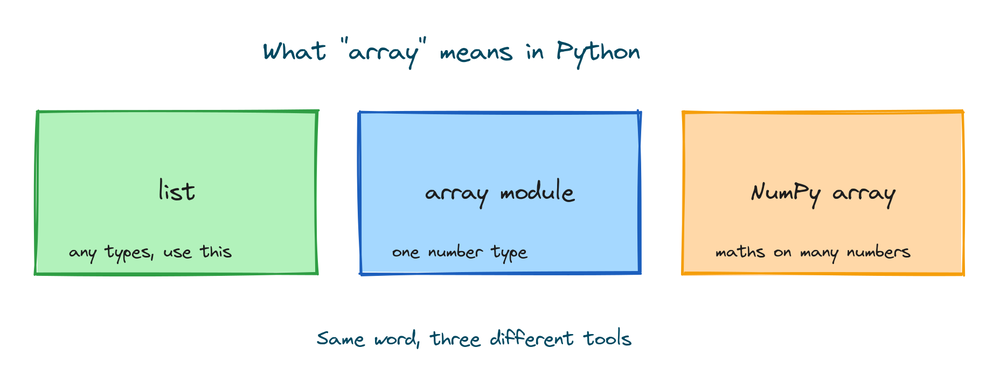
Here's the short version. A list is the everyday container, and it's what most people should use. The array module is a standard-library type that stores numbers of one type in a compact way. A NumPy array is a separate library built for maths on large sets of numbers. We'll take them one at a time.
Using a list as an array
A list does everything a beginner wants from an array. You make one with square brackets, and it holds items in order:
scores = [90, 85, 77, 60]
print(scores[0])
print(scores[2])
# Output:
# 90
# 77
The number in the brackets is the index, and it starts at 0. So scores[0] is the first item, not the second. You change an item by assigning to its index:
scores = [90, 85, 77, 60]
scores[1] = 88
print(scores)
# Output: [90, 88, 77, 60]
You add to the end with append(), count the items with len(), and go through them with a for loop:
scores = [90, 88, 77, 60]
scores.append(100)
print(scores)
print(len(scores))
for s in scores:
    print(s)
# Output:
# [90, 88, 77, 60, 100]
# 5
# 90
# 88
# 77
# 60
# 100
That's index, change, add, count, and loop, the five things people usually want an array for. A list gives you all of them, and it can hold any mix of types. For 95% of Python programs, this is the array you want.
The array module for typed numbers
Python does have something called an array in its standard library, in the array module. The difference from a list is that every item must be the same type, and you pick that type when you make the array. You have to import the module first:
import array

nums = array.array('i', [1, 2, 3])
print(nums)
# Output: array('i', [1, 2, 3])
Notice how it prints. Not [1, 2, 3] like a list, but array('i', [1, 2, 3]), showing the type code and the values. That 'i' is the typecode. It tells Python "these are signed integers". For floats you'd use 'd':
import array

prices = array.array('d', [1.5, 2.5, 3.0])
print(prices)
# Output: array('d', [1.5, 2.5, 3.0])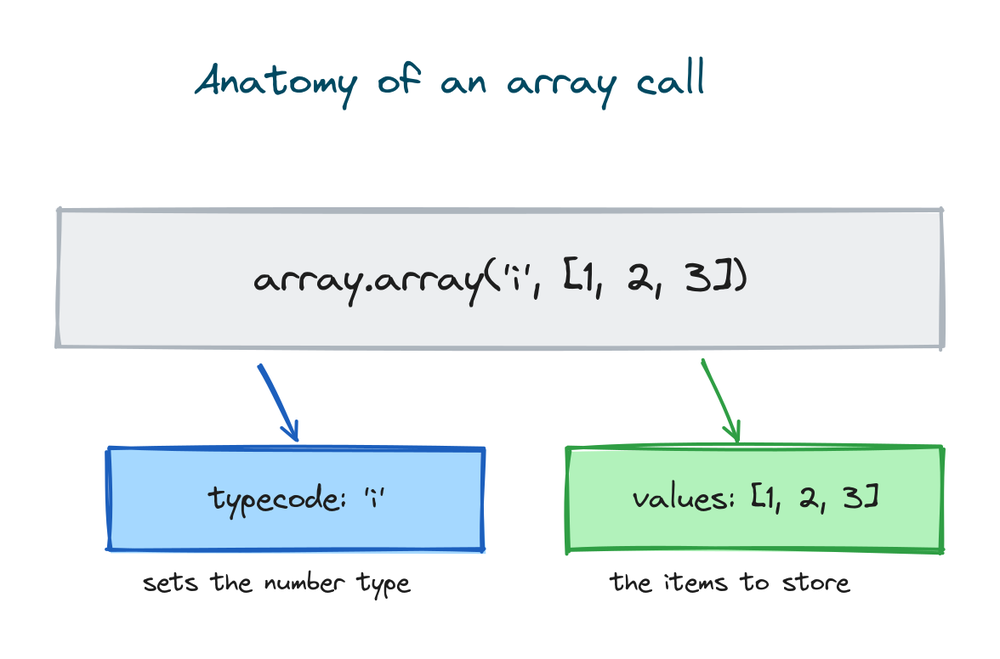
Reading and looping work exactly like a list. Index with brackets, loop with for:
import array

nums = array.array('i', [10, 20, 30, 40, 50])
print(nums[0])
for x in nums:
    print(x)
# Output:
# 10
# 10
# 20
# 30
# 40
# 50
What happens when you put the wrong type in
This is the part that surprises people. An array('i', ...) holds integers, and only integers. Try to add a float and Python stops with an error:
import array

nums = array.array('i', [1, 2, 3])
nums.append(1.5)
# TypeError: 'float' object cannot be interpreted as an integer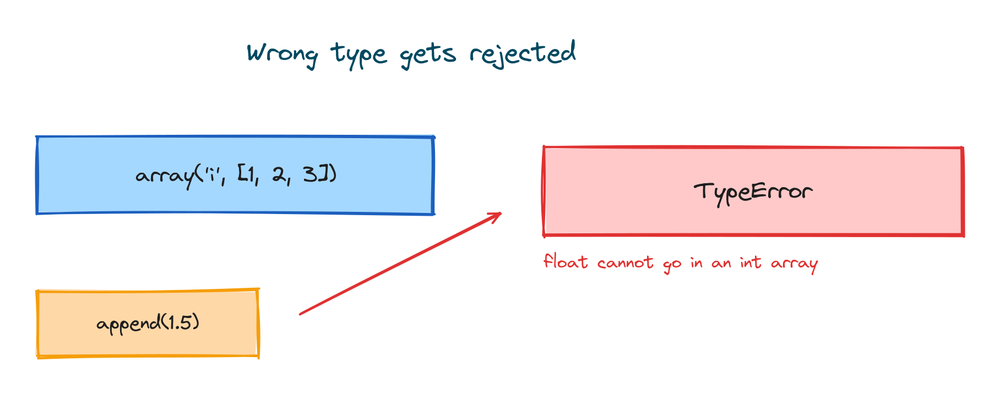
The same thing happens if you mix types when you build it, so array.array('i', [1, 2, 3.5]) raises the same TypeError. A list would take the float without complaint. The array module won't, and that's the whole point of it. The array module gives up flexibility to keep every item the same type.
Why typed arrays exist at all
So why give up the flexibility? Memory. A list of numbers is really a list of pointers, each one pointing to a full Python object somewhere else in memory. That's flexible but heavy. An array.array stores the raw numbers packed next to each other, the same way C does, so a million integers take far less space.
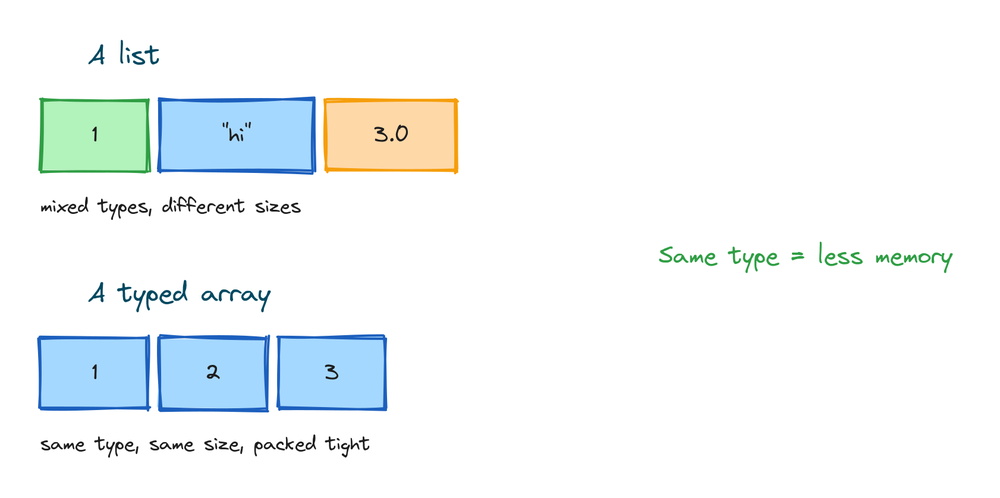
For a handful of numbers you'll never notice the difference, and the list is easier. The array module is useful when you have a very large block of same-type numbers and memory is tight, or when you need to read or write raw binary number data, like a file of samples or a network packet. Those are real but narrow cases. Most days you won't need it.
Common array module operations
The array module supports most of the same methods a list does. Here they are on one array. Watch how each line changes it:
import array

a = array.array('i', [1, 2, 3])
a.append(4)
print(a)
a.insert(1, 99)
print(a)
a.remove(99)
print(a)
print(a.pop())
print(a)
print(a.index(3))
print(a.tolist())
# Output:
# array('i', [1, 2, 3, 4])
# array('i', [1, 99, 2, 3, 4])
# array('i', [1, 2, 3, 4])
# 4
# array('i', [1, 2, 3])
# 3
# [1, 2, 3]
A quick tour of what each one does. append() adds to the end. insert(1, 99) puts 99 at index 1 and shifts the rest right. remove(99) deletes the first 99 it finds. pop() removes and returns the last item, here 4. index(3) tells you where 3 sits. And tolist() gives you back a plain list, which is handy when you're done with the compact storage and want a normal list again.
A table of common typecodes
The typecode is the single letter that sets what kind of number the array holds. You don't need all of them. In practice you'll use 'i' for integers and 'd' for floats and rarely touch the rest. Here are the ones worth knowing:
| Typecode | Holds | C type | Bytes each |
|---|---|---|---|
'b' | small integer | signed char | 1 |
'i' | integer | signed int | 4 |
'l' | larger integer | signed long | 4 or 8 |
'f' | float | float | 4 |
'd' | float, more precision | double | 8 |
The "bytes each" column is why the array module saves memory: each item is exactly that many bytes, with nothing extra. You can check the size yourself with nums.itemsize, which returns 4 for an 'i' array. The full list of typecodes lives in the array module documentation.
Slicing and looping work like lists
Once you have an array, day-to-day use feels the same as a list. A slice with the colon gives you a section, and the result is another array:
import array

a = array.array('i', [10, 20, 30, 40, 50])
print(a[1:4])
# Output: array('i', [20, 30, 40])
a[1:4] means "from index 1 up to, but not including, index 4". This is the same slice rule lists and strings use, so nothing new to learn. Membership tests with in, iteration with for, and len() all behave the way you'd expect. If you already know lists, you already know how to move around an array.
NumPy for maths on whole arrays
The third meaning of "array" is the NumPy array, and it's the one most experienced Python people mean when they say the word. NumPy is a separate library you install with pip install numpy. Its array does one thing very well: maths on every item at once, without writing a loop.
With a plain list you'd loop to double every number. With a NumPy array you write arr * 2 and it doubles all of them in one step, much faster than a Python loop. That's why data science, machine learning, and scientific work run on NumPy. Here it is as a transcript, since NumPy isn't installed in the runner on this page:
>>> import numpy as np
>>> arr = np.array([1, 2, 3, 4])
>>> arr * 2
array([2, 4, 6, 8])
>>> arr + 10
array([11, 12, 13, 14])
>>> arr.mean()
2.5
You won't need NumPy on day one. But once your work involves large sets of numbers, whole-array maths, or anything labeled data science, NumPy is the tool. It has its own full lessons, so treat this as a signpost, not the deep dive.
When to use which one
Here's the plain advice. Use a list unless you have a specific reason not to. Use the array module only when you need a large, compact block of same-type numbers or raw binary number data. Use NumPy when you're doing maths across many numbers at once.
| Tool | Holds | Best for | Need to install? |
|---|---|---|---|
| list | any mix of types | almost everything | No, built in |
| array module | one number type | large compact number blocks, binary data | No, standard library |
| NumPy array | one number type | maths on many numbers at once | Yes, pip install numpy |
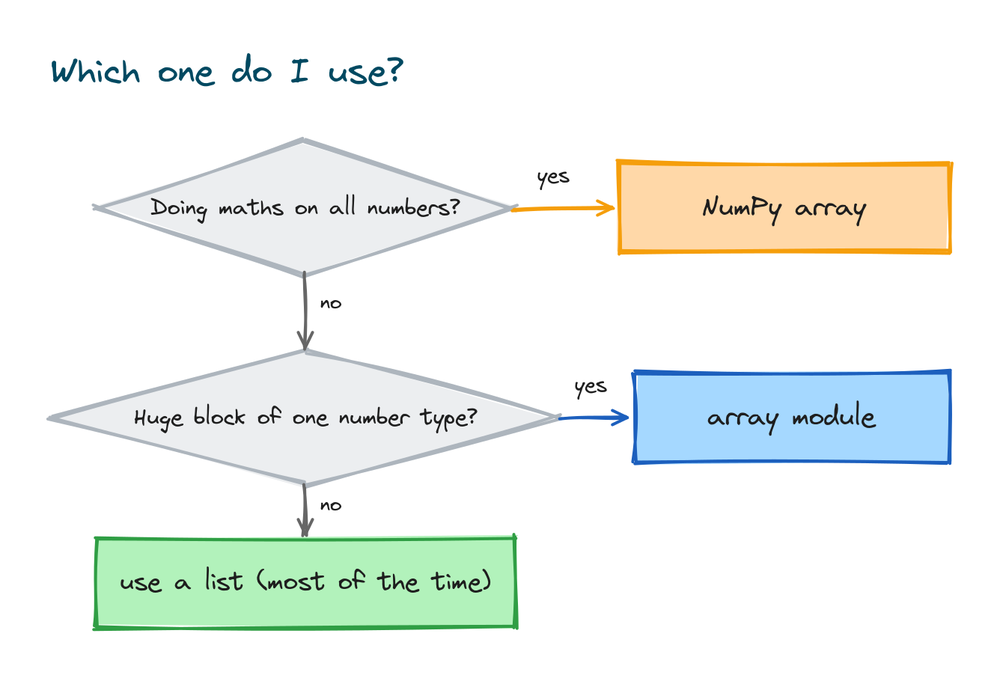
If you're a beginner and unsure, use a list. You'll go a long way before you meet a problem a list can't handle, and when you do, you'll know it because your program will be slow or run out of memory. Until then, the list is the right call.
Practice exercises
Try each one yourself before you open the solution. Everything you need is above.
Change a value in a list
Make a list of three temperatures, then change the middle one to 30 and print the list.
# Solution
temps = [22, 25, 28]
temps[1] = 30
print(temps)
# Output: [22, 30, 28]
Add to a list and count it
Start with a list of two names, add a third with append(), then print how many names there are.
# Solution
names = ["Asha", "Ravi"]
names.append("Meera")
print(names)
print(len(names))
# Output:
# ['Asha', 'Ravi', 'Meera']
# 3
Build an integer array
Import the array module and make an integer array holding 5, 10, and 15. Print it and its first item.
# Solution
import array
a = array.array('i', [5, 10, 15])
print(a)
print(a[0])
# Output:
# array('i', [5, 10, 15])
# 5
Grow an array with append
Take the array from the last exercise, add 20 to the end, then turn it into a plain list.
# Solution
import array
a = array.array('i', [5, 10, 15])
a.append(20)
print(a)
print(a.tolist())
# Output:
# array('i', [5, 10, 15, 20])
# [5, 10, 15, 20]
Sum the numbers in an array
Make a float array of three prices and print their total with sum().
# Solution
import array
prices = array.array('d', [1.5, 2.5, 3.0])
print(sum(prices))
# Output: 7.0
Common mistakes
- Expecting a C-style array to exist. There's no
int nums[5]in Python. You declare nothing up front. Use a list, or import the array module. - Mixing types into an array('i'). A typed array holds one type only. Adding a float raises
TypeError: 'float' object cannot be interpreted as an integer. A list would accept it. - Forgetting import array. The array module isn't loaded by default. Without
import arrayat the top,array.array(...)raises aNameError. - Using the array module when a list is fine. For a few dozen numbers the compact storage saves nothing worth having, and the single-type rule just gets in your way. Use a list.
- Thinking array means NumPy array. The standard-library array module and NumPy are different things. The array module can't do
arr * 2across every item. That's a NumPy feature.
Frequently asked questions
Does Python have arrays?
Not a built-in array type like C or Java. Python gives you the list for everyday use, an array module in the standard library for compact same-type numbers, and the separate NumPy library for maths on large number sets. When a tutorial says "array" without more detail, it usually means a list.
What's the difference between a list and an array in Python?
A list can hold any mix of types and needs no import. An array from the array module holds one number type only and stores it compactly. For most work the list is the right choice; the array module is for large blocks of same-type numbers.
How do I create an array in Python?
For most cases, make a list with square brackets: nums = [1, 2, 3]. For a typed array, run import array then array.array('i', [1, 2, 3]), where 'i' is the typecode for integers.
What is a typecode?
A single letter you pass to array.array() that sets what kind of number the array holds. 'i' means signed integer and 'd' means float. It's how the array module knows how many bytes each item takes.
When should I use NumPy?
When you're doing maths across many numbers at once, or working in data science and machine learning. NumPy applies an operation like arr * 2 to every item without a loop, which is much faster than doing it in plain Python. For small everyday tasks, a list is enough.
How do I get the length of an array?
Use len(), the same as with a list. len(nums) returns the number of items, and it works on a list, an array.array, and a NumPy array.
Can a Python array hold mixed types?
A list can, so [1, "two", 3.0] is fine. An array.array cannot; every item must match the typecode, and mixing types raises a TypeError. If you need mixed types, use a list.
Do I need to set the array size in advance?
No. Unlike C, Python never asks you to declare a size. Lists and arrays both grow as you add items with append(), and shrink when you remove them.
Key takeaways
- Python has no built-in array type. "Array" means one of three things: a list, the
arraymodule, or a NumPy array. - A list handles index, change, append, len, and loop, holds any type, and is the right choice about 95% of the time.
- The
arraymodule holds one number type, set by a typecode like'i'or'd', and stores it compactly. Put in the wrong type and you get aTypeError. - Slicing, looping, and
len()on anarray.arraywork just like a list, andtolist()converts it back to a plain list. - NumPy is a separate library for maths on whole number sets at once, the tool for data science, not something you need on day one.
Since a list does almost everything an array is for, that's where to spend your time next. Get comfortable with slicing, adding, and removing items, and you'll have covered most of what everyday Python needs. The full walkthrough is in the guide to Python lists.