

 By Kaustubh Saini
Say you're building a small app and you need to store prices: tea costs 10, coffee costs 25, juice costs 40. You could use two lists, one for names and one for prices, and hope they stay lined up. That's fragile. If you sort one list and forget the other, the prices point at the wrong drinks. A dictionary keeps each name next to its price in one place, so they can never drift apart.
A dictionary stores data in pairs: a key and a value. You look things up by the key, the same way you look up a word in a paper dictionary to find its meaning. This lesson covers how to make one, how to read and change it, how to loop over it, and the small rules that trip up beginners. Every example below runs, and each one shows its output.
What a dictionary is
A real dictionary maps a word to its meaning. A Python dictionary does the same thing: it maps a key to a value. The key is what you look up. The value is what you get back.
prices = {"tea": 10, "coffee": 25, "juice": 40}
print(prices)
# Output: {'tea': 10, 'coffee': 25, 'juice': 40}
Here the keys are "tea", "coffee", and "juice". The values are the prices. Each key points to one value, and you use the key to fetch that value. Curly braces { } wrap the whole thing, a colon joins each key to its value, and commas separate the pairs. You can check how many pairs a dictionary holds with len():
prices = {"tea": 10, "coffee": 25, "juice": 40}
print(len(prices))
# Output: 3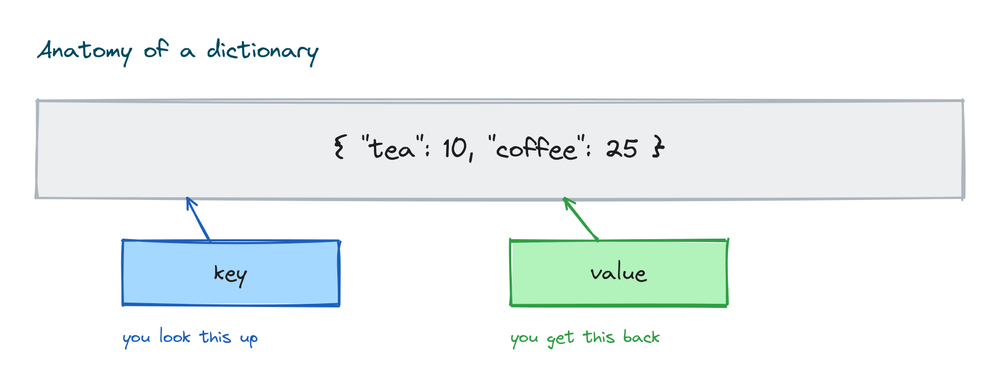
Creating a dictionary
There are two common ways to make one. The first is curly braces with your pairs inside:
student = {"name": "Asha", "age": 21, "city": "Pune"}
print(student)
# Output: {'name': 'Asha', 'age': 21, 'city': 'Pune'}
The second is the dict() function, where you pass the keys as if they were argument names:
student = dict(name="Asha", age=21, city="Pune")
print(student)
# Output: {'name': 'Asha', 'age': 21, 'city': 'Pune'}
Both give the same result. Use curly braces for most cases. They read cleanly and they let your keys be numbers or other types, which dict() with the argument style can't do. To start with an empty dictionary, use empty braces:
empty = {}
print(empty, type(empty))
# Output: {} <class 'dict'>
Note that {} makes an empty dictionary, not an empty set. That surprises people, so it's worth remembering. An empty set needs set() instead.
Reading values from a dictionary
To get a value, put its key in square brackets:
prices = {"tea": 10, "coffee": 25}
print(prices["tea"])
# Output: 10
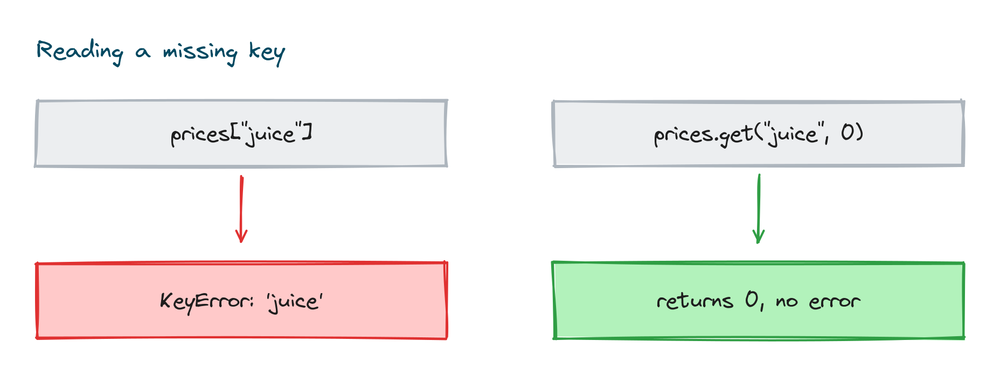
This works well when you're sure the key is there. But if you ask for a key that doesn't exist, Python stops with an error:
prices = {"tea": 10, "coffee": 25}
print(prices["juice"])
# KeyError: 'juice'
The safer way is .get(). It returns the value if the key exists, and None if it doesn't, with no error:
prices = {"tea": 10, "coffee": 25}
print(prices.get("coffee"))
print(prices.get("juice"))
# Output:
# 25
# None
You can also give .get() a default to return when the key is missing. This is handy for prices, counts, and settings:
prices = {"tea": 10, "coffee": 25}
print(prices.get("juice", 0))
# Output: 0
One thing to know: .get() only reads. It does not add the missing key to the dictionary. After the line above, prices still has just two pairs. Use square brackets when a missing key means a real bug you want to hear about. Use .get() when a missing key is normal and you want a fallback.
Adding, changing, and removing items
Dictionaries can change after you make them. To add a new pair, assign to a new key. To change an existing value, assign to a key that's already there. The syntax is the same for both:
scores = {"asha": 90}
scores["ravi"] = 85    # new key, adds a pair
scores["asha"] = 95    # existing key, changes the value
print(scores)
# Output: {'asha': 95, 'ravi': 85}
Python knows the difference by checking if the key is already in the dictionary. If it is, the old value is replaced. If it isn't, a new pair is added at the end. There's no separate "add" command and no separate "edit" command. One line handles both.
Removing with del, pop, popitem, and clear
You have a few ways to take pairs out, and each does something slightly different. del removes a pair by its key:
data = {"a": 1, "b": 2, "c": 3}
del data["a"]
print(data)
# Output: {'b': 2, 'c': 3}
.pop() removes a key and hands you back its value, so you can use it:
data = {"b": 2, "c": 3}
value = data.pop("b")
print(value)
print(data)
# Output:
# 2
# {'c': 3}
Like .get(), .pop() takes an optional default so it won't error on a missing key:
data = {"c": 3}
result = data.pop("z", "not found")
print(result)
# Output: not found
.popitem() removes and returns the last pair as a small tuple. It takes no key:
data = {"c": 3, "d": 4}
pair = data.popitem()
print(pair)
print(data)
# Output:
# ('d', 4)
# {'c': 3}
.clear() empties the whole dictionary:
data = {"c": 3}
data.clear()
print(data)
# Output: {}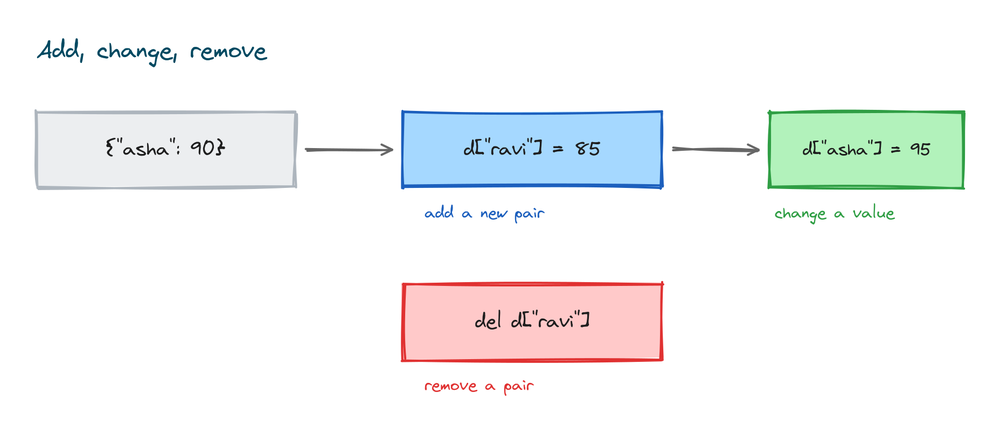
Looping over a dictionary
Before the loops, three methods let you pull out parts of a dictionary. .keys() gives all the keys, .values() gives all the values, and .items() gives each key-value pair together:
student = {"name": "Asha", "age": 21, "city": "Pune"}

print(list(student.keys()))
print(list(student.values()))
print(list(student.items()))
# Output:
# ['name', 'age', 'city']
# ['Asha', 21, 'Pune']
# [('name', 'Asha'), ('age', 21), ('city', 'Pune')]
Each pair from .items() is a small tuple of two things, the key and the value. That shape is what makes the two-variable loop work. When you loop over a dictionary directly, you get its keys, one at a time:
student = {"name": "Asha", "age": 21}
for key in student:
    print(key)
# Output:
# name
# age
Most of the time you want both the key and its value. Loop over .items() and catch each pair in two variables:
student = {"name": "Asha", "age": 21, "city": "Pune"}
for key, value in student.items():
    print(key, "->", value)
# Output:
# name -> Asha
# age -> 21
# city -> Pune
The two names key and value can be anything you like. Pick names that fit your data, like name, price for a price list. Python fills the first from the key and the second from the value on each turn of the loop.
If you only care about the values, loop over .values(). Here we add up prices:
prices = {"tea": 10, "coffee": 25, "juice": 40}
total = 0
for price in prices.values():
    total += price
print(total)
# Output: 75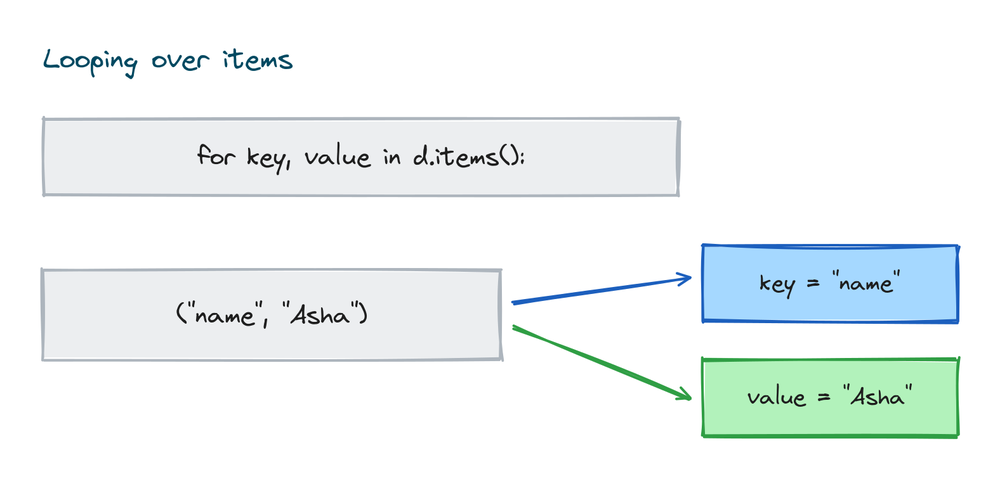
Checking if a key exists
The in keyword tells you whether a key is present. It gives back True or False:
student = {"name": "Asha", "age": 21}
print("name" in student)
print("email" in student)
# Output:
# True
# False
This is the clean way to avoid a KeyError before reading a key:
student = {"name": "Asha", "age": 21}
if "email" in student:
    print(student["email"])
else:
    print("No email on file")
# Output: No email on file
Note that in checks keys, not values. If you need to search the values instead, use value in student.values().
Nested dictionaries
A value can be another dictionary. That lets you store a record for each item, which is a common shape for real data like a set of student records:
students = {
    "S101": {"name": "Asha", "age": 21, "grades": [88, 92, 79]},
    "S102": {"name": "Ravi", "age": 22, "grades": [75, 80, 85]},
}
print(students["S101"]["name"])
print(students["S102"]["grades"][0])
# Output:
# Asha
# 75
You reach an inner value by stacking the keys. students["S101"] gives you Asha's record, and the second ["name"] reaches into that record. The grades are a list inside the record, so ["grades"][0] mixes a key and a list position on the same line. You can change an inner value the same way:
students = {"S101": {"name": "Asha", "age": 21}}
students["S101"]["age"] = 22
print(students["S101"]["age"])
# Output: 22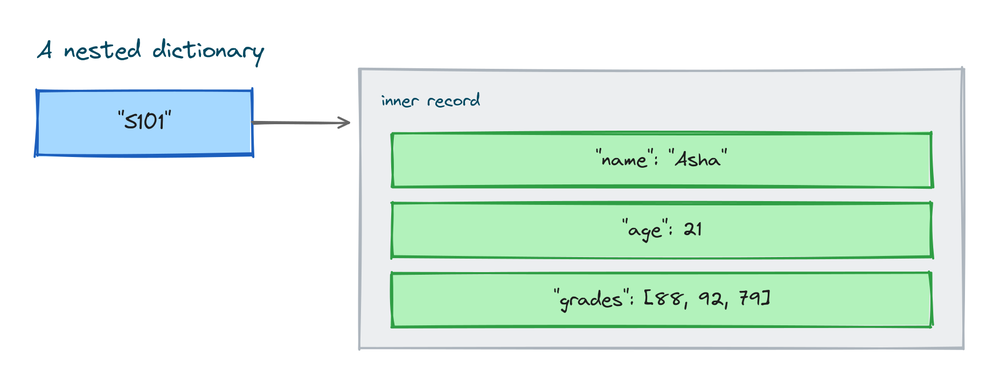
Looping over a nested dictionary
The two-variable loop from earlier works here too. Each value is a whole record, so you can read its fields inside the loop. This prints each student's average grade:
students = {
    "S101": {"name": "Asha", "grades": [88, 92]},
    "S102": {"name": "Ravi", "grades": [75, 80]},
}
for sid, record in students.items():
    average = sum(record["grades"]) / len(record["grades"])
    print(sid, record["name"], average)
# Output:
# S101 Asha 90.0
# S102 Ravi 77.5
The loop hands you the ID as sid and the inner dictionary as record. From there you read record["name"] and record["grades"] like any other dictionary.
More useful dictionary methods
A few more methods come up often. Here's what each one does.
| Method | What it does |
|---|---|
update() | Adds pairs from another dictionary, overwriting any keys that clash. |
setdefault() | Returns a key's value, and if the key is missing, adds it with a default first. |
fromkeys() | Builds a new dictionary from a list of keys, all sharing one starting value. |
update() merges one dictionary into another:
a = {"x": 1}
a.update({"y": 2, "x": 9})
print(a)
# Output: {'x': 9, 'y': 2}
setdefault() is a read that also fills in a missing key:
a = {"x": 1}
value = a.setdefault("z", 0)
print(value)
print(a)
# Output:
# 0
# {'x': 1, 'z': 0}
fromkeys() starts every key at the same value, which is a quick way to set up counters or a status list:
seats = dict.fromkeys(["a1", "a2", "a3"], "free")
print(seats)
# Output: {'a1': 'free', 'a2': 'free', 'a3': 'free'}
The rules for keys and their order
Keys follow two rules. First, keys must be unique. If you write the same key twice, the last one wins and the earlier one is thrown away:
duplicate = {"a": 1, "a": 2}
print(duplicate)
# Output: {'a': 2}
Second, a key must be an immutable type. Strings, numbers, and tuples can be keys. A list cannot, because a list can change after you make it. Try it and Python stops:
bad = {[1, 2]: "value"}
# TypeError: unhashable type: 'list'
Numbers and tuples work fine as keys, so you can mix key types in one dictionary:
mixed = {1: "one", 2.5: "two point five", (0, 0): "origin", "name": "Asha"}
print(mixed)
# Output: {1: 'one', 2.5: 'two point five', (0, 0): 'origin', 'name': 'Asha'}
Values have no such rules. A value can be anything: a list, another dictionary, or a number.
Dictionaries keep their order
Since Python 3.7, a dictionary remembers the order you added things in. When you loop over it or print it, the pairs come out in that same order:
order = {}
order["first"] = 1
order["second"] = 2
order["third"] = 3
print(list(order.keys()))
# Output: ['first', 'second', 'third']
In older Python versions the order was not guaranteed, so old tutorials warn that dictionaries are unordered. That advice is out of date. On any version you'll use today, insertion order is kept.
Counting things with a dictionary
One of the most common uses for a dictionary is counting. Say you want to count how many times each word appears in a sentence. Start with an empty dictionary, then for each word, add one to its count:
text = "the cat sat on the mat the cat ran"
counts = {}
for word in text.split():
    counts[word] = counts.get(word, 0) + 1
print(counts)
# Output: {'the': 3, 'cat': 2, 'sat': 1, 'on': 1, 'mat': 1, 'ran': 1}
The trick is counts.get(word, 0). The first time a word shows up, it isn't in the dictionary yet, so .get() returns the default 0, and you add one to make it 1. Every time after that, it returns the running count. This same pattern counts letters, votes, or anything else. The .split() call here comes from working with strings, which breaks the sentence into a list of words.
Building a dictionary in one line
When the pairs follow a pattern, you can build a dictionary with a single line instead of a loop. This is a dictionary comprehension. It reads as "key colon value, for each item". Here we map each number to its square:
nums = [1, 2, 3, 4]
squares = {n: n * n for n in nums}
print(squares)
# Output: {1: 1, 2: 4, 3: 9, 4: 16}
It does the same work as a for loop that adds one pair at a time, just shorter. If the loop version reads more clearly to you, keep the loop. The one-line form uses the same idea as a list comprehension, only with a key and a value.
Dictionary versus list
Both a dictionary and a list hold many items, but you reach into them differently. A list uses a number position. A dictionary uses a key you choose. Pick based on how you'll look things up.
| Point | List | Dictionary |
|---|---|---|
| How you look up an item | By position, like items[0] | By key, like prices["tea"] |
| What it holds | A row of values | Key-value pairs |
| Written with | Square brackets [ ] | Curly braces { } |
| Best when | Order matters and items have no name | Each item has a natural label |
| Finding an item | Slower, it may scan the whole list | Fast, it jumps straight to the key |
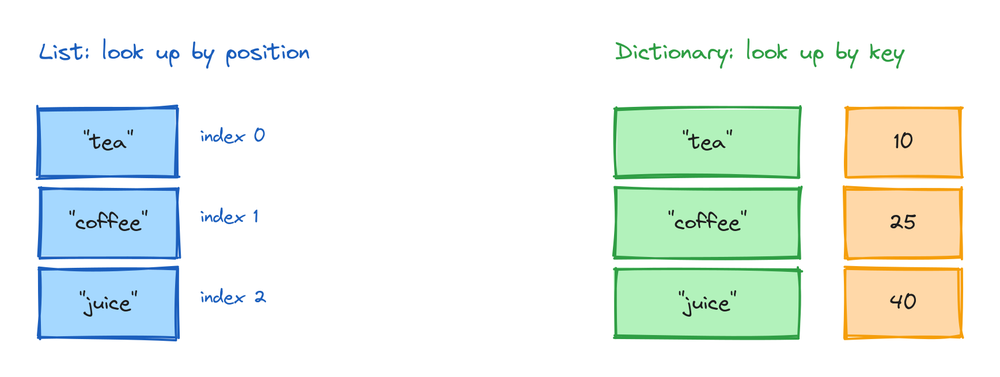
If your data is a plain sequence, like a queue of names, use a list. If each item has a label you'll search by, like a price per drink, use a dictionary. You can also nest them: a list of dictionaries is a common way to hold many records.
Practice exercises
Try each one before you look at the solution. Everything you need is above.
Build a capitals lookup
Make a dictionary of three countries and their capitals, then print the capital of Japan.
# Solution
capitals = {"India": "New Delhi", "Japan": "Tokyo", "France": "Paris"}
print(capitals["Japan"])
# Output: Tokyo
Read a key without an error
Given a stock dictionary, print the count for "eraser", using 0 when it isn't there.
# Solution
stock = {"pen": 12, "book": 3}
print(stock.get("eraser", 0))
# Output: 0
Count the letters in a word
Count how many times each letter appears in "banana".
# Solution
word = "banana"
letter_counts = {}
for letter in word:
    letter_counts[letter] = letter_counts.get(letter, 0) + 1
print(letter_counts)
# Output: {'b': 1, 'a': 3, 'n': 2}
Print every pair
Loop over a prices dictionary and print each name with its price.
# Solution
prices = {"tea": 10, "coffee": 25}
for name, price in prices.items():
    print(name, "costs", price)
# Output:
# tea costs 10
# coffee costs 25
Merge two shopping lists
Merge two dictionaries so the second one's values win on any shared key.
# Solution
morning = {"eggs": 2, "milk": 1}
evening = {"milk": 2, "bread": 1}
combined = morning | evening
print(combined)
# Output: {'eggs': 2, 'milk': 2, 'bread': 1}
Common mistakes
- Using square brackets on a missing key.
prices["juice"]raises a KeyError if "juice" isn't there. Use.get()when a key might be missing. - Trying to use a list as a key.
{[1, 2]: "x"}is a TypeError. Keys must be immutable, so use a tuple instead of a list. - Expecting
{}to be an empty set. Empty braces make an empty dictionary. For an empty set, useset(). - Repeating a key. Writing the same key twice keeps only the last value. The earlier pair is dropped without any warning.
- Thinking
inchecks values."Asha" in studentchecks the keys, not the values. To search values, use"Asha" in student.values(). - Changing a dictionary while looping over it. Adding or removing keys inside a
forloop over the same dictionary raises a RuntimeError. Loop over a copy of the keys withlist(d.keys())if you must change it.
Frequently asked questions
How do I create a dictionary in Python?
Wrap key-value pairs in curly braces, like {"name": "Asha", "age": 21}. A colon joins each key to its value and commas separate the pairs. You can also use dict(name="Asha", age=21), and {} makes an empty one.
How do I get a value without an error if the key is missing?
Use .get() instead of square brackets. d.get("key") returns None if the key is absent, and d.get("key", 0) returns your own default. Square brackets raise a KeyError on a missing key.
How do I loop over both keys and values?
Loop over .items() and catch each pair in two variables: for key, value in d.items():. Looping over the dictionary directly gives you only the keys.
How do I check if a key exists in a dictionary?
Use the in keyword: "name" in d returns True or False. It checks keys. To check values, use "Asha" in d.values().
Can dictionary keys be numbers?
Yes. Numbers, strings, and tuples can all be keys because they're immutable. A list can't be a key. You can even mix key types in one dictionary.
Are Python dictionaries ordered?
Yes, since Python 3.7. A dictionary keeps items in the order you added them, so looping and printing come out in that order. Older versions did not guarantee this, which is why old tutorials call them unordered.
What is the difference between a dictionary and a list?
A list stores values in order and you reach them by number position, like items[0]. A dictionary stores key-value pairs and you reach values by key, like prices["tea"]. Use a dictionary when each item has a natural label.
How do I merge two dictionaries?
Since Python 3.9 use the | operator: a | b returns a new dictionary with both, and b's values win on any shared key. On older versions, a.update(b) merges b into a in place.
Key takeaways
- A dictionary stores key-value pairs, written as
{"key": value}. You look up values by their key. - Read with square brackets when the key must exist, or
.get()when it might be missing..get()returns a default instead of raising a KeyError. - Assign to a key to add or change a pair. Remove with
del,.pop(),.popitem(), or.clear(). - Loop over
.items()for both keys and values, and useinto check for a key. - Keys must be unique and immutable, so strings, numbers, and tuples work but lists don't. Since Python 3.7, a dictionary keeps its insertion order.
Dictionaries pair each value with a name. Sets are the other side of that coin: they hold a group of values with no keys and no duplicates, which makes them perfect for membership checks. That's what we look at in Python sets.